Babyshin: A Beautiful Font for Small Business
As a small business owner, I’ve learned that the details matter. From the first glance of a product label to the last line of a thank-you card, every visual element contributes to how customers perceive your brand. That’s why when I came across Babyshin, I knew it had potential beyond just being a pretty font. It felt like something that could elevate my brand’s look without feeling too flashy or over-the-top.
What Is Babyshin and Why It Stands Out
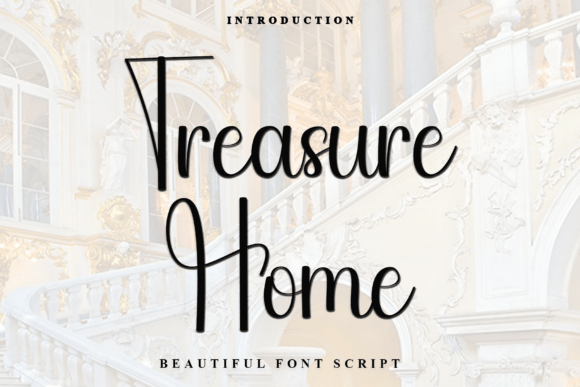
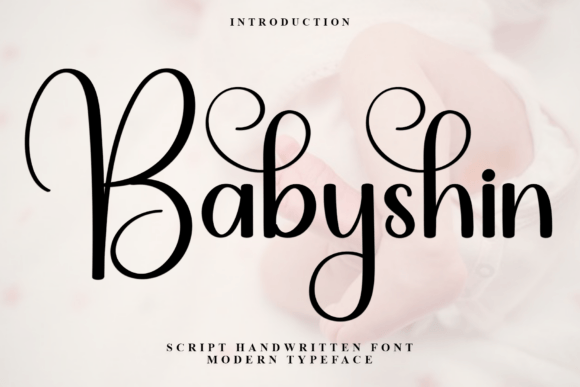
Babyshin is a script handwritten font with a soft, unique touch. Its distinctive strokes give it a special character, making it feel both personal and professional. Unlike some fonts that can be too ornate or difficult to read, Babyshin strikes a balance between elegance and clarity. It has a warm, approachable vibe that works well for businesses aiming to feel friendly and authentic.
The font’s personality feels like a hand-drawn signature, which makes it perfect for logos, headlines, and decorative elements. Whether you're designing packaging, social media posts, or website banners, Babyshin adds a touch of individuality that can make your brand stand out in a crowded market.
Real-World Use Cases for Babyshin
I recently redesigned my bakery’s packaging and wanted something that felt fresh and inviting. Babyshin worked beautifully on the box labels, giving them a custom, handmade feel without sacrificing readability. The font looked great next to a clean sans serif for the ingredients list, creating a nice contrast that made the design feel more polished.
Another time, I used Babyshin on a skincare product label. The font added a sense of care and attention to detail, which aligned perfectly with the brand’s message. It was easy to pair with a simple serif font for the product description, making the whole design feel cohesive and professional.
For a café menu update, Babyshin was ideal for the header. It gave the menu a more personalized touch, especially when paired with a modern sans serif for the item descriptions. The result was a design that felt both stylish and easy to read, even at a quick glance.
When to Use Babyshin and When to Avoid It
Babyshin excels as a display font. It’s best suited for headlines, short phrases, logos, and packaging titles. Its flowing style makes it perfect for decorative accents or eye-catching text that needs to stand out. However, it’s not the best choice for long paragraphs or body text due to its intricate strokes, which can reduce legibility in smaller sizes or on mobile screens.
When using Babyshin on labels or printed materials, it’s important to keep the text size generous enough to maintain clarity. For digital use, such as social media thumbnails or website banners, it works well as a headline but should be paired with a more readable font for supporting text.
Font Pairing Tips for Babyshin
One of the strengths of Babyshin is how well it pairs with other fonts. For a balanced look, try pairing it with a clean sans serif like Montserrat or Poppins. This creates a modern, professional aesthetic while letting Babyshin shine as the focal point.
If you’re going for a more elegant or vintage feel, pairing Babyshin with a serif font like Lora or Playfair Display can add sophistication. For a more casual or creative vibe, a handwritten font like Pacifico or Great Vibes can complement Babyshin nicely.
When working on branding materials, consider using Babyshin for logos, headings, and key messages, while relying on a simpler font for the rest of the copy. This helps maintain visual consistency while keeping the design accessible and easy to read.
Final Thoughts on Babyshin for Small Businesses
As someone who’s spent time testing fonts for different projects, I’ve found that Babyshin is a versatile and appealing choice for small businesses looking to enhance their visual identity. It brings a sense of warmth and creativity that can help build a stronger connection with customers.
Whether you're updating product labels, redesigning a menu, or creating social media graphics, Babyshin offers a unique blend of style and functionality. Just be sure to check the font’s file formats, weights, and licensing before using it for commercial purposes. With the right approach, Babyshin can become a valuable part of your design toolkit.